$90 Million Ad Spend: Engaged Audience and Existing Customer Analysis
· Articles
Phil here, Director of Paid Social. We went through 76 accounts & $90M ad spend from January - May 2026
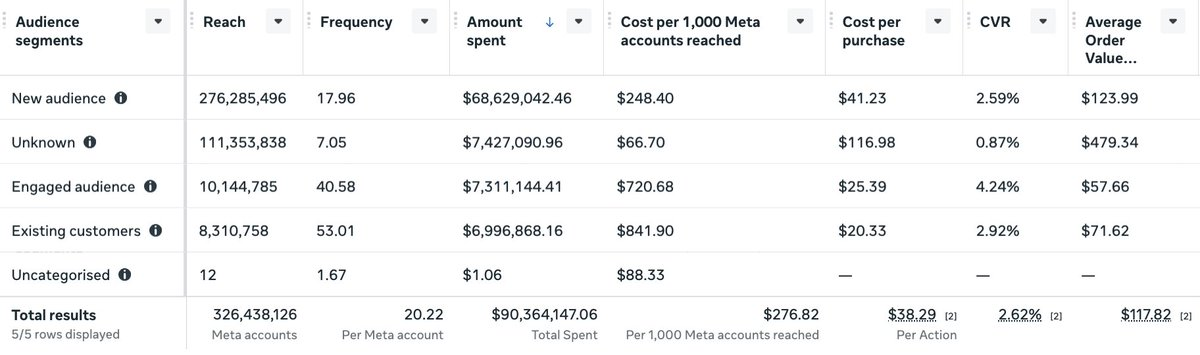
We pulled the audience segment breakdown across more than 70 ad accounts and compared New Audience, Engaged Audience, and Existing Customer data side by side.
Frequency
The average account frequency across the portfolio averaged between 7.5 and 9.4 per month throughout the period. If you looked at that number you'd think it was manageable. Some accounts would flag it, most wouldn't.
But blended frequency is the average across all segments combined. When you break it out, the picture changes.
New Audience frequency averaged 3.4 to 4.2. That's healthy. The algorithm is finding new people, serving the ad a few times, moving on.
Engaged Audience frequency averaged 11.5 to 15.1. Three to four times higher than New Audience.
Existing Customer frequency averaged 15.6 to 20.5. Four to six times higher than New Audience.
The people who have already bought from you are seeing your ads twenty times a month on average. The people who have already engaged with your brand are seeing them fifteen times. And the blended number sitting in your dashboard is hiding both of those facts behind a single figure that looks fine.

Spending more. Reaching fewer people. Welcome to the 'death spiral.' It’s a slow bleed that kills growth if you don’t catch it early.
Why it happens:
– Launching too many ad sets relative to your budget increases Frequency
– Lack of creative, format, message diversity
– Relaxed exclusions
– Scaling past your TAM
What happens next:
– Net new reach shrinks.
– Spend rises to compensate.
– CPMR (cost per reach) skyrockets.
– You blame, CVR, ROAS, the algorithm
Fewer new customers, higher costs.
Fix it early:
1. Watch net new % (new audience vs returning).
2. Exclude past visitors/social engagers to force colder reach.
3. Consolidate campaigns to simplify testing.
4. Spend on non-PUR campaigns (easy to get wrong)
Shrinking reach isn’t a dip. It’s a warning.
CPMr
CPMr tells you the true cost of reaching 1,000 unique people. Not impressions. Not page views. Unique accounts.
Across the 76 accounts, here is what it costs to reach 1,000 unique people per segment:
New Audience: $81.
Engaged Audiences: $468.
Existing Customers: $607.
Reaching your engaged audience costs 5.7 times more per unique person than reaching cold prospecting audiences. Reaching your existing customers costs 7.4 times more.
If you're only looking at a blended CPMr, you're managing the average of all three. The number might not look alarming. The segment breakdown shows you exactly where the inefficiency is concentrated.
Everyone watches ROAS and CPA.
By the time those move, the problem has been building for weeks.
CPMr moves first. It's CPM multiplied by frequency. When it climbs consistently, your reach pool is narrowing and the algorithm is stuck in a loop re-serving ads to the same people.
It's the metric I look at before anything else. Here's why →
Why I don't shut up about CPMr
I talk about CPMr a lot. Rising CPMr is one of the earliest signs that something is wrong with an account: before ROAS drops, before CPA climbs, before anyone…

Why Meta does this, and why your ROAS looks fine while it's happening
The CVR data explains exactly why the algorithm gravitates toward warm audiences.
Prospecting converts at 2.91%. Engaged audiences convert at 4.05%. Existing customers convert at 7.86%.
CPA follows the same pattern. Prospecting median CPA across the portfolio was $58.12. Existing customers: $26.61.
The algorithm is doing exactly what it's designed to do. It's finding the cheapest conversions. Existing customers buy at the lowest cost. Engaged audiences buy more readily than cold prospects. From a pure conversion volume perspective, this is optimal behaviour.
The problem is those conversions are largely not incremental. Existing customers were going to buy again. Engaged audiences were already in the consideration pool. You're not growing your customer base. You're paying to accelerate purchases that would have happened anyway.
Platform ROAS stays strong throughout. The account looks healthy. The segment breakdown shows you that 16% of spend is going to engaged and existing audiences, up from 15% in January. Month by month, the drift is quiet enough to go unnoticed.
Spend per Audience Segment
In January, 81.1% of portfolio spend went to prospecting. 6.3% went to engaged audiences. 9% went to existing customers.
By May, prospecting had fallen to 72.4%. Engaged had risen to 10.4%. In absolute terms, Engaged Audience spend went from $1.32M per month to $1.86M per month.
That's a 41% increase in budget going to warm audiences over five months. Without anyone deliberately choosing to spend more on warm audiences. Without a campaign structure change. Without a strategy decision.
Meta found the efficient audiences and quietly shifted budget toward them. This is how it works. It's not a bug. It's a feature.
It's the algorithm optimising for what it's told to optimise for. Your job is to know it's happening and decide whether you're comfortable with the trajectory.
You cannot see this in standard Ads Manager reporting without audience segment breakdowns.
What you can see once segments are defined
Audience segments don't change what's happening in your account. They make what's already happening visible.
With segments defined and tracked over time, you can see the spend percentage going to each cohort week by week. You can see frequency by segment, not just blended. You can see CPMr by segment and identify which cohort is driving the account-level number up. You can see CVR by segment and distinguish genuine new customer acquisition from conversion of warm audiences that would have converted anyway.
Without segments, you're managing one set of blended numbers that smooth over the underlying dynamics. A blended frequency of 8 tells you very little. A segment-level frequency showing prospecting at 4 and existing customers at 18 tells you exactly where the problem is and exactly where to intervene.
The intervention changes too. Frequency-driven CPMr on existing customers gets fixed with stronger exclusions and a controlled retention budget. Frequency-driven CPMr on engaged audiences gets fixed with consolidation and middle-of-funnel structure. You can't make that distinction without the segment data.
Set your Audience Segments now
Audience segment data is only available from the date you define them.
You cannot go back and view historical data by segment. If you set them up today, you start tracking from today. Everything before that is gone. You cannot diagnose why March performance dropped by looking at the segment split in March. You cannot compare Q1 by segment if segments weren't defined in Q1.
Every week without segments defined is a week of diagnostic data you will never recover.
13 of the 76 accounts in this analysis had no segments defined. Those accounts are managing entirely on blended metrics. For those accounts, the frequency gaps and spend drift documented above are invisible. They may be happening. There is no way to know.
The setup takes about ten minutes. The data starts accumulating from that point forward. The longer you wait, the longer the gap in your diagnostic history.
Setting them up
Go to Advertising Settings in the All Tools menu in Meta Ads Manager. Find the Audience Segments section.
Define your Engaged Audience using every custom audience that reflects people who have interacted with your brand but not purchased. Website visitors, email subscribers, app activity, lead form submissions. Include as many signals as possible.
Define your Existing Customers using purchase-based custom audiences. A customer list of purchasers, a website custom audience based on the Purchase event, any audience that reflects someone who has completed a transaction.
One thing worth knowing: social media engagers - people who have liked, commented on, or shared your posts on Facebook or Instagram - cannot be added to your Engaged Audience in advertising settings. Meta always classifies them as New Audience. You can exclude them from specific ad sets, but they will never appear in your Engaged Audience segment breakdown. This affects how you interpret the New Audience figures, particularly for brands with large organic followings or high-engagement partnership ad activity.
Once defined, add the Audience Segments breakdown in Ads Manager under the Breakdowns menu. Set a recurring check for spend percentage by segment. What you're watching for is the prospecting percentage holding steady as you scale, and engaged and existing percentages staying controlled.
Most accounts won't do this until something breaks. By then the diagnostic history is already missing for the period when the break was building.
The data above comes from accounts where segments were defined and tracked. That's the only reason it exists.
Read more about CPMr:https://taikundigital.com/phil-kiel/cpmr-calculation
Book a call with me.
Data covers 76 Meta ad accounts, January to May 2026. All accounts anonymised. Figures represent portfolio-level aggregates and averages. Individual account performance varies.