YouTube CTV Advertising Formats, Targeting, and Best Practices
· YouTube
YouTube CTV (connected TV) advertising puts your video ads on the biggest screen in the house. When someone watches YouTube on their smart TV, Roku, Fire TV, or gaming console, they see your ad in a lean-back, full-attention environment that mobile and desktop cannot replicate.
YouTube is now the most-watched streaming platform on TV screens in the US, surpassing Netflix and every other streaming service. This guide covers the ad formats available, how targeting works on CTV, what it costs, and how to measure whether your spend is actually driving incremental results.
What Is YouTube CTV Advertising
YouTube CTV advertising is the delivery of video ads to viewers watching YouTube on connected TV devices. Smart TVs, Roku, Fire TV, Apple TV, gaming consoles, and any device that connects a television to the internet all fall into the CTV category. The ads play within the YouTube app on the TV screen, combining the full-screen living room experience with Google's logged-in user data for targeting.
You buy YouTube CTV ads through Google Ads or Display & Video 360. The setup is similar to other YouTube campaigns, but you target TV screens specifically. This distinction matters because CTV viewers behave differently than mobile or desktop users. They watch longer. They often watch with other people in the room and they cannot click through to your site the way someone on a phone can.
YouTube CTV vs YouTube TV vs Mobile YouTube Ads
This is where confusion starts for most advertisers. YouTube CTV, YouTube TV, and standard YouTube ads are three separate things.
| Feature | YouTube CTV | YouTube TV | Mobile/Desktop YouTube |
|---|---|---|---|
| Where ads appear | YouTube app on smart TVs and streaming devices | Live TV streaming service (cable replacement) | YouTube app/browser on phones, tablets, computers |
| Buying method | Google Ads, DV360 | YouTube Select reservations | Google Ads, DV360 |
| Typical viewer behavior | Lean-back, co-viewing | Live sports/news viewing | Active browsing, shorter sessions |
YouTube CTV is the YouTube app running on a television. YouTube TV is a separate subscription service that replaces cable with live channels and DVR. When you run a standard YouTube campaign without device targeting, your ads show across mobile, desktop, and tablets. CTV requires intentional targeting to reach the TV screen.
We broke down the 7 step YouTube ad framework to help you win on the platform.
Why YouTube CTV Reach Matters for DTC Brands
YouTube is the most-watched streaming platform on TV screens in the US, with over 200 million Americans watching YouTube on connected TVs every month. More watch time happens on YouTube via CTV than on Netflix, Hulu, or any other streaming service. For DTC brands, this represents a massive audience that has cut the cord on traditional television. Streaming has surpassed combined broadcast and cable viewership for the first time.
The co-viewing dynamic changes the math on impressions. When someone watches YouTube on their living room TV, other household members often see the ad too. One impression can reach two or three people. Mobile and desktop placements do not offer this.
CTV also provides a brand-safe, premium content environment. You show up alongside creator content that viewers actively chose to watch. The attention quality is higher than interrupting a doomscroll session on a phone. You can even target specific video line-ups that align closely with your ICP and their YT habits.
YouTube CTV Ad Formats
Most CTV formats are non-skippable and range from 6 to 60 seconds. The TV screen experience favors longer, more immersive creative than what works on mobile.
Skippable In-Stream Ads
Skippable in-stream ads play before, during, or after videos. The viewer can skip after 5 seconds. You pay when the viewer watches 30 seconds or engages with the ad. This format is less common on CTV because the lean-back viewing experience makes skipping less frequent, but it remains available.
Non-Skippable In-Stream Ads
Non-skippable in-stream is the primary CTV format. You have two length options: 15 seconds and 30 seconds. Google recently enabled 30-second non-skippable ads to align with traditional TV standards. Viewers watch the full ad with no skip option. CPMs are higher, but completion rates are 100%.
Bumper Ads
Bumper ads are 6-second non-skippable units. They work best for reinforcing brand messages or retargeting audiences who have already seen your longer creative. Think of bumpers as the reminder, not the introduction. They are a great way to sequence users after being exposed to a longer-form first touchpoint.
YouTube Select CTV Lineups
YouTube Select is reserved inventory on premium, brand-safe content. You get guaranteed placement alongside top creators and specific content categories. This option is ideal for brands that want control over where their ads appear and are willing to pay a premium for it.
Masthead on CTV
The Masthead appears on the YouTube Home feed on TV screens. It dominates the screen when viewers first open the app. This format requires reservation and a significant budget, typically $50k+ per day depending on market.
YouTube CTV Targeting Capabilities
CTV targeting uses Google's first-party data from logged-in users. This is the core advantage over linear TV, where targeting is limited to broad demographics and dayparts.
Demographic and Affinity Targeting
You can target by age, gender, parental status, and household income. Affinity audiences group users by lifestyle interests like "fitness enthusiasts" or "home decor enthusiasts." Google builds affinity signals from logged-in user data across Search, YouTube, and other Google properties.
Geographic and DMA Targeting
You can target by country, state, city, zip code, or DMA (Designated Market Area). This is useful for regional brands or for testing markets before scaling nationally. A brand launching in Texas can run CTV only in Dallas and Houston DMAs before expanding.
Custom Segments and In-Market Audiences
Custom segments let you build audiences from search behavior, app usage, and URLs visited. In-market audiences capture users actively researching or preparing to purchase within a category. If someone has been searching for "best running shoes," they are in-market for athletic footwear.
Household and Co-Viewing Signals
CTV ads often reach multiple viewers per impression. Google uses household-level signals, but targeting remains tied to the logged-in user profile. You are targeting the account holder, but the ad reaches whoever is in the room.
Targeting Limitations on the TV Screen
Be direct with yourself about what CTV cannot do. There is no click-through tracking. Remarketing is more limited than on mobile or desktop. Direct-response actions are weaker because users have to scan a QR code or search separately to take action. CTV is an awareness and consideration channel, not a direct-response channel.
How to Buy YouTube CTV Ads
You buy YouTube CTV through Google Ads or DV360. The platform you choose depends on your budget and whether you want auction-based or reserved inventory.
Google Ads for YouTube CTV Awareness Campaigns
In Google Ads, the setup follows this path:
- Goal: Select "Awareness and consideration"
- Campaign type: Choose "Video" then "Non-skippable in-stream"
- Device targeting: Set to "TV screens"
- Bidding: Optimize for reach or impressions using Target CPM
There is no minimum spend requirement for auction-based campaigns. If you are new to the platform, a step-by-step Google Ads tutorial covers the basics. You can start testing CTV with a few thousand dollars.
DV360 for Reserved Inventory and YouTube Select
DV360 is the platform for larger advertisers who want reserved placements, YouTube Select access, or programmatic guaranteed deals. It typically requires higher minimum spend and is often managed through an agency. If you are spending $100k+ per month on YouTube, DV360 unlocks inventory and controls that Google Ads does not offer.
Here's how we think about YouTube Ads as a whole and where CTV (View or CPM bidding), fits within that setup.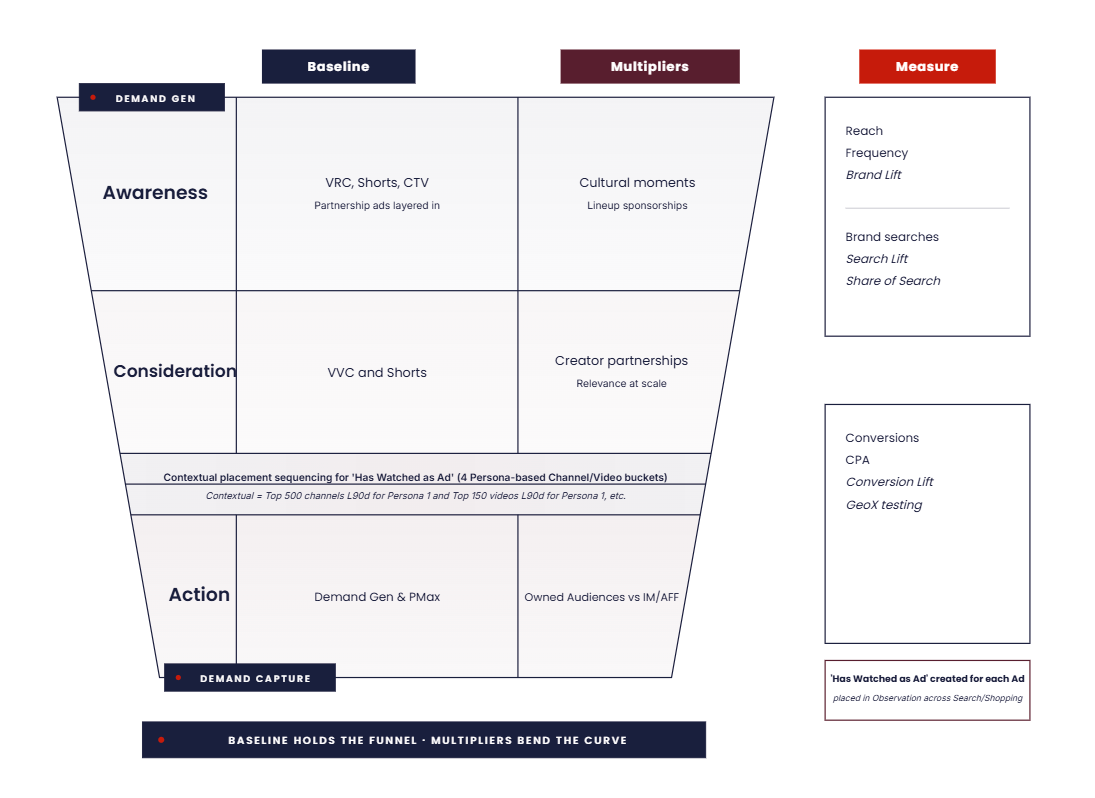
YouTube CTV Advertising Costs and CPM Benchmarks
CPM (cost per thousand impressions) is the primary pricing model for CTV. CTV CPMs run higher than mobile and desktop YouTube because you are buying premium, non-skippable inventory on the largest screen in the house.
Several factors drive cost:
- Ad length: 30-second spots cost more than 15-second
- Placements: If you are not excluding waste channels (kids, asmr, etc)
- Targeting: Narrow audiences increase CPMs
- Seasonality: Q4 and tentpole events drive prices up (think Prime Day)
- Buying method: Reserved inventory commands premium pricing
How to Measure YouTube CTV Performance and Incrementality
Measurement on CTV requires a different mindset than direct-response channels. While Alphabet reported YouTube CTV ads drove over 1 billion conversions in 12 months, view-through conversions alone are unreliable because everyone "views" a non-skippable ad. The question is whether views actually drove incremental purchases.
Conversion Lift Studies
Conversion lift is Google's first-party measurement comparing exposed versus control groups. It requires minimum spend thresholds, typically $10k+ over the measurement period. This is the best option for measuring downstream purchases directly within the Google ecosystem.
Geo Holdout Tests
Hold out CTV spend in matched markets to isolate true lift. Run CTV in half your DMAs and compare sales performance against the holdout markets. This is the cleanest incrementality signal for ecommerce brands and does not require Google's participation.
Brand Lift and Ad Recall
Google's Brand Lift surveys measure ad recall, awareness, and consideration. This is useful for upper-funnel campaigns where purchase is not the immediate goal. You are measuring whether people remember seeing your ad and whether it changed their perception.
Media Mix Modeling
MMM uses statistical modeling across all channels to attribute revenue. It works best for brands with sufficient spend history and multiple active channels. If you are spending $500k+ per month across Google, Meta, and CTV, MMM helps you understand the true contribution of each channel.
Best Practices for YouTube CTV Campaigns
1. Build Creative for the 10-Foot Screen
Creative designed for mobile does not work on TV. Use large text, bold visuals, and clear audio. Front-load your message in the first 5 seconds. Avoid small product details or fine print that viewers cannot read from across the room.
2. Separate CTV Inventory from Mobile and Desktop
Do not bundle CTV with other devices in the same campaign. Create dedicated CTV campaigns to control bidding, budgets, and creative separately. This gives you clean data on CTV performance and prevents mobile from cannibalizing your TV budget.
3. Layer Audiences with Frequency Caps
Set frequency caps to avoid overexposure. A typical cap is 3 to 5 impressions per user per week on CTV. Layering targeting, such as in-market plus affinity, improves precision without shrinking your audience too much. We'll cover more of that below.
4. Run Incrementality Tests Before Scaling
Prove CTV is driving lift before increasing budget. Use geo holdouts or conversion lift studies. Do not scale based on view-through attribution alone. We have seen brands in our audits that waste six figures on CTV that looked great in-platform but showed zero incremental lift in holdout tests.
5. Pair CTV with Lower-Funnel Search and Social
CTV drives awareness that often converts elsewhere. Coordinate CTV with branded search and retargeting to capture demand generated by TV exposure. The viewer sees your ad on TV, searches your brand on their phone, and converts through a search ad. Without the search campaign, you lose that customer.
Common YouTube CTV Mistakes to Avoid
Repurposing Vertical Social Creative
Vertical 9:16 assets are less than ideal on TV. Produce or adapt creative for 16:9 horizontal format. The investment in proper CTV creative pays for itself in performance.
Trusting View-Through Attribution Alone
Platforms over-credit CTV because completion rates are 100% on non-skippable ads. Incrementality testing, alongside Conversion Lift Studies, are the preferred way to validate performance claims. At minimum, 'Has Watched Video as an Ad' should be added to observation audiences in Search and Shopping. Also, check with your rep to see if you have Attributed Brand Search available. It's an easy and free way to measure the effectiveness of upper funnel. Someone sees an Ad, opens their phone, searches your brand. If you are not testing, you are guessing.
Over-Targeting Narrow Audiences
CTV CPMs rise quickly with small audiences. Balance precision with scale. Broad affinity audiences often outperform hyper-targeted segments on CTV because you maintain enough reach to hit frequency goals without paying $50+ CPMs.
Ignoring Frequency Caps
Without caps, budget gets wasted showing the same ad repeatedly to the same household. We see the same frequency issues in Meta accounts. Set and monitor frequency from day one. If your frequency exceeds 5 per week, you are burning money. We prefer Impression and View settings together. 3:3 is a standard practice (3 Impressions and 3 Views per week).
When to Use YouTube CTV Advertising
CTV fits specific use cases well:
- Brand awareness campaigns: Launching new products or entering new markets
- Full-funnel strategy: Pairing CTV awareness with search and social upper-funnel campaigns and feeding middle-to-bottom funnel DemandGen
- Reaching cord-cutters: Audiences unreachable via linear TV
- Consideration-stage targeting: In-market / Affinity / Custom Audiences / Lookalikes: audiences actively researching
CTV is not the right choice for pure 100% direct-response goals with limited budget or situations requiring immediate click-through actions. CTV is however, the best way to grow the funnel and feed DemandGen, Shopping, and Search. We'll go deeper on DemandGen in a later post.
Run YouTube CTV with Taikun Digital
YouTube CTV works when it is part of an integrated measurement stack. Every dollar you spend on CTV has to defend itself through incrementality testing. We run CTV alongside search and social with clean measurement so you know what your advertising is actually doing to the bottom line.
If you are considering CTV via YouTube or want to audit your current setup, book a 15-minute call to discuss your strategy.